Your AI context, collected and always in sync
Your CLAUDE.md, READMEs and AI instructions live scattered across every project. DocSync gathers them into one place and syncs to iCloud the instant you save — and you choose exactly which files to collect.
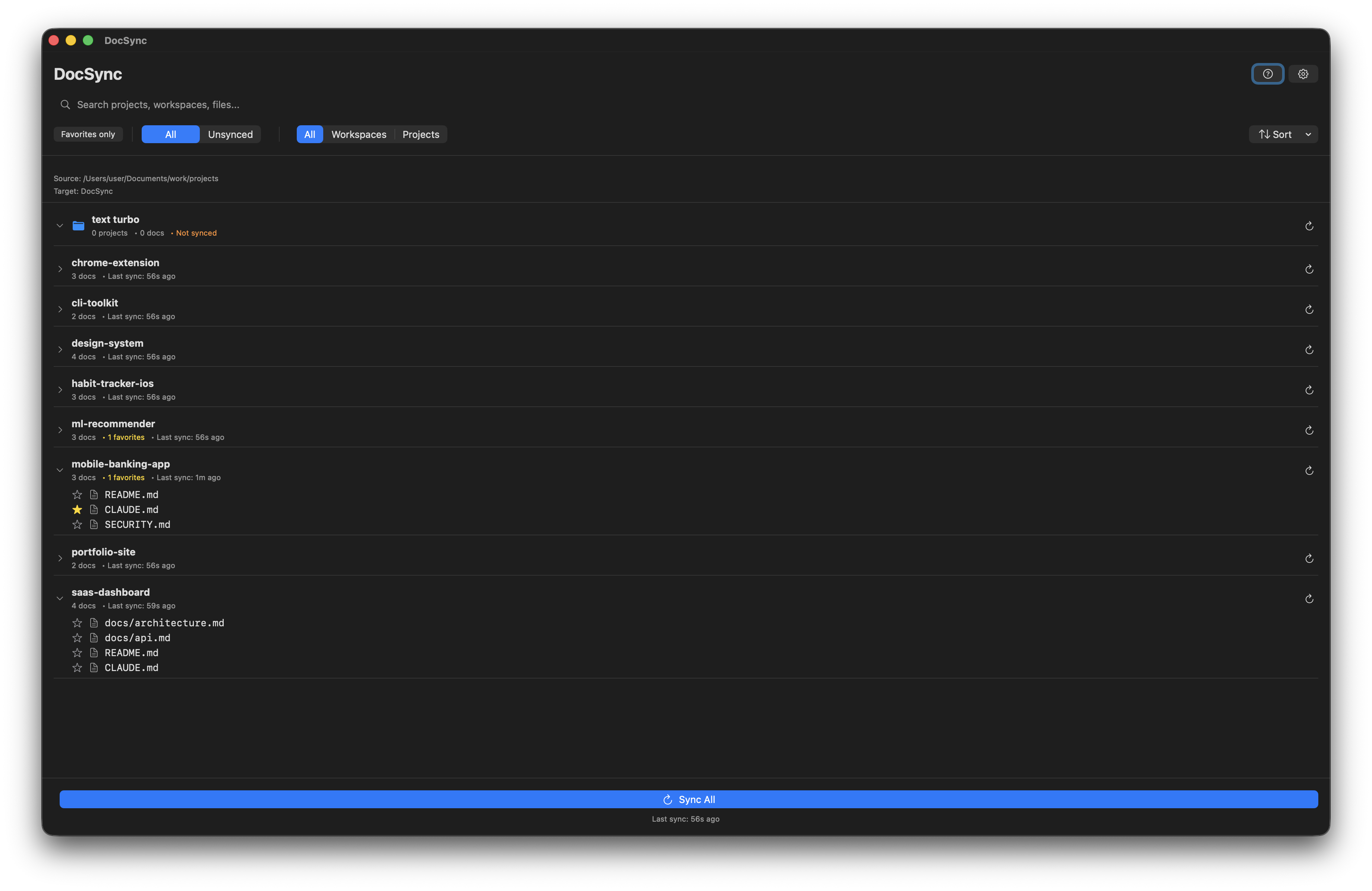
Your AI instructions are scattered. That costs you every day.
The files that teach your AI assistant how to work live deep inside each repo. They drift out of sync, get duplicated, and you can never find the good version when you start a new project.
DocSync pulls them out of every project folder and keeps a single, current copy in one place — backed up and available on all your Macs.
*.md
CLAUDE.md
README.md
.cursorrules
.cursor/rules
AGENTS.md
.github/copilot-instructions.md
/.claude/plans
Markdown out of the box — add any extension or path you need.
Built for the way you actually work with AI
Point DocSync at your projects folder. It does the rest — quietly, in the menu bar.
Syncs the moment you save
Real-time file watching with an adjustable debounce. Edit a CLAUDE.md in any project and the updated copy lands in your central folder seconds later — no manual sync, no schedule to remember.
Straight to iCloud
Sync to iCloud Drive, Dropbox, or any folder — so your docs follow you to every Mac, iPad and iPhone, and stay safely backed up.
Sync any file you choose
Markdown out of the box. Add any extension or specific path — .cursorrules, AGENTS.md, .txt, whatever your setup uses.
Only what changed
Content-hash comparison means unchanged files are skipped. Fast even across dozens of repos.
Workspaces
Group related projects together and keep the destination folder organized exactly how you think.
Favorites
Pin the handful of files you reuse across projects to their own quick-access folder.
Never lose an edit
Conflict handling backs up the old version before replacing, so a local change is never silently overwritten.
Many sources & targets
Scan multiple project locations at once and sync to several destinations simultaneously.
Fully offline
Everything happens locally on your Mac. Nothing is uploaded to us, ever. No account required.
From scattered to synced in three steps
Point it at your projects
Pick the folder (or folders) where your repos live as the source.
Choose a destination
iCloud Drive, Dropbox, or any local folder. Set it once.
Turn on instant sync
Enable real-time watching. DocSync lives in the menu bar and keeps everything current.
Open from anywhere
Your full, current AI context — on every device, neatly organized.
Who it's for
AI-first developers
If you live in Claude Code, Cursor, or Copilot, your context files are core tooling. Keep them collected, versioned in one spot, and ready to reuse.
Read anywhere
Leaving the house? Your plans and docs sync to the cloud automatically, so you can open and read them on your iPad or phone whenever you have a spare moment.
Prompt & plan libraries
Building a personal library of instructions and project plans? DocSync makes one backed-up home for all of it, identical on every device.
Be first to get DocSync
DocSync is in the works. Leave your email and we'll let you know the moment it's ready — and you'll get the launch price.
No spam — one email when it launches. Unsubscribe anytime.
Questions
Which files does DocSync collect?
Out of the box, Markdown (.md). In settings you can add any extension (.txt, .mdc, .json, anything) or specific paths like .cursorrules or AGENTS.md — so it works for any files, not just docs.
Does it really sync instantly?
Yes. With real-time file watching enabled, DocSync detects a save and syncs within seconds, using an adjustable debounce to avoid redundant copies during rapid edits. You can also run on a schedule or sync manually.
Where does my data go?
Nowhere we can see. All file operations are local to your Mac. DocSync has no account and uploads nothing. You choose the destination — including iCloud Drive, Dropbox, or a local folder.
Is it a subscription?
No. One-time purchase, yours to keep, with free updates.
What are the requirements?
macOS 12 or later. DocSync runs in the menu bar and uses macOS security-scoped access — you grant folder permission once.
Can I get a refund?
Yes — if it's not for you, email support@text-turbo.com within 14 days for a full refund.